How to Use Condeco App to Book Workspace?

What Is Condeco?
Have you ever considered working online but not from home? Do you need to rent workspaces to meet colleagues or business partners from time to time? How to book the workspace and make sure your booking won’t disappear? So many questions and only one reliable solution – the Condeco app.
Many IT specialists claim that the booking workspaces and the management of daily schedules. Imagine reserving a workstation or meeting room within seconds. You can also book parking spots, lockers, quiet spaces, breakout zones, and many other things with just a few taps on your device’s screen or from your browser. The Condeco room booking service offers a smooth experience and seamless integration for IT specialists and small businesses.

The Major Features of the Condeco Desk Booking System
Instant Booking
The Condeco app provides a fast and easy way to reserve workspaces. Do you require a desk or perhaps a meeting room? No worries, just use the app. In just a few taps, you have claimed your space. The app handles other aspects too like parking, lockers, and quiet zones – it’s all taken care of for your workstation requirements.
Comprehensive Booking Management
Manage your daily working plan with Condeco. View all bookings in a list or on a floor plan. Do you want to make a change? Edit or cancel reservations with one click. Managing your workspace bookings has never been easier.
Team Collaboration Is Easier
Are you ready for a team day? The Condeco app simplifies it. Just invite your colleagues, pick the location, and book the required workspaces for colleagues.
Effortless Check-In
Condeco makes it very easy to check into your workspace. Use on-screen check-ins, QR codes, or automatic proximity-based check-ins. Starting your work has never been quicker and easier.
Stay Updated with Notifications
The app from Condeco will send you notifications in real-time, directly to your device so you always stay updated and on time.

Find Colleagues Quickly
Do you have a colleague who needs to work together with you? Quickly find out where they are working and reserve a space close by in just a few minutes.
Check-In and Out
Use your phone with the Condeco app installed to check in at your reserved desk, and when you’re done, release it so that someone else can use the space.
Locate Your Desk
Don’t get misplaced, use the app to locate your desk on a floorplan that you have booked; this will help you know where to proceed all the time.

Simple Installation
Get the app from the official stores for Android/iOS – Google Play or Apple App Store – and install it with one click on your mobile device. You can also choose to subscribe for automatic updates, ensuring you always have the newest version.
Any Workspace Booking
You can reserve any type of space, whether it is a personal area like desks, quiet booths, or breakout spaces, meeting areas such as rooms for video meetings and boardrooms; conference & event website; parking space or locker.
Smart Calendar
Connect Condeco with Microsoft Outlook. This feature will let you book meeting areas straight from your email software. It can handle organizing repeating meetings, maintaining service requests, and managing virtual meetings using MS Teams or Zoom. The automatic updates of the booking position are added.

Analytics & Reporting
Track down the office usage with advanced analytics, report on capacity, use, and contact tracing using robust analytics abilities via Microsoft Power BI for data-based understandings.
Powered by the Up-To-date Technology
The Condeco booking system is constructed on Microsoft Azure Cloud and acknowledged as a Microsoft Gold Partner, with frequent automatic updates, and InfoSec certification (ISO 27001, CSA Star, FSQS). It is evaluated as a G2 Market Leader as well as a Gartner Leader in workspace management solutions.
The Most Common Condeco Booking App’s Benefits:
- Total Booking Solution. People love the simple interface helping to book any workspace online – from workstations to parking spaces;
- Responsive Customer Support. The Condeco Logo Support team is quick to respond and knowledgeable, with users liking the helpful and friendly assistance;
- User-friendly. The Condeco app is easy to understand, with a clear interface and simple instructions;
The Most Common Condeco Software Complaints:
- Admin Limitations. For some users, the admin features aren’t enough because of too many menus.
- Network Interference. Problems in the outside network might impact the app’s working, but it’s not Condeco’s error;
What makes Condeco unique is its easy-to-use interface and full range of features. It’s a product designed for the future, with ongoing development and flexibility to adjust as the industry changes. If you are moving from another tool, Condeco can provide a strong answer that thinks ahead to meet needs in managing today’s workspace.
How to Get Started?
1) Get the App. You can find it in the Apple App Store or Google Play store. The app is also available for use through any web browser. Your company will provide the login details.
2) After you get inside, go on a tour. The layout is easy to understand but it’s good to look around. The main display usually exhibits the desks and rooms ready for use.

3) Then, set up your profile. Add your profile picture and the specs about your job. This will assist in locating each other when one is at the workplace.
4) Now, let’s book a desk. It’s simple:
- Choose your date in a calendar;
- Select a floor or area;
- Pick an available desk/monitor/office room;
- Confirm your booking;
Reserve a large meeting room in the same way. You can invite participants right from the app.
5) Also, take a look at the map feature. It will display the location of your booked desk or room. Now there is no chance of getting lost in big co-working offices!
6) For regular bookings you may create repeating reservations. This helps in saving time when you have a fixed office routine.
7) Don’t forget to sync the Condeco app with your calendar application. This way, all of your bookings will be visible in one location.
If you have any issues with the Condeco app installation and setup, check this video located on the company’s YouTube channel.
Explaining the Condeco Meeting Room Screens Booking
Recently the Condeco software team presented a brand new feature called the Meeting Room Screens Booking.
This new premium option allows managing your meeting spaces with Condeco’s intuitive booking screens. Directly from the app’s or website’s dashboard, you can check the availability of the room bookings in your area and then reserve them straight from the screens during the virtual meeting with your colleagues.
The Condeco app or website will show the room availability with red color for occupied, yellow for booked, and green for available. You can easily check the status from a distance without the Condeco connect to the place’s manager online.
The new option allows following the unrequired bookings automatically. If hosts do not arrive at a certain location, the meeting rooms become available for you or your teammates to book at once.
Also, you will get a chance to schedule the meetings on the screen and change their duration term as well. Cut or extend the meeting sessions whenever needed.

Use your RFID cards or a six-digit PIN for quick and secure room booking, check-in, checkout, and extensions of booking the workspace — all these features are accessible from the app with the touchscreen interface.
The Condeco app offers features such as health check-ups, power-saving options, and branding on screens – whether there are ten or a thousand of them.
Here is what you can do thanks to this option:
- Activate new screens on remote;
- Monitor the screen’s health;
- Set power-saving schedules;
- Apply corporate branding to your booked meetings;
- Control the screen settings;
Many Reddit users already discussed this new Condeco feature allowing booking the meeting room screens. What do you think about this new addition – can it help you or your team to work more effectively?
The Case Studies of Using Condeco Desk Booking Software
Scenario 1: The Flexible Worker
Introduce Sarah. She visits the office for 3 full business days every week. Thanks to the Condeco app, she can reserve her working desk ahead of time. She is aware that before arriving, she will be able to work in a peaceful area remote from the office and home. No rush to search the spot right before the workday.
Scenario 2: The Team Meeting
John’s team resides and works in various places. Some of them do their work from home, and others visit the office. John can reserve a meeting room using the Condeco booking system to accommodate all of them. He can also check who from his team will be present at the office today.

Scenario 3: The Office Manager
Lisa handles a big office routine being an administrator including the workplace location and arranging virtual/offline meetings with partners and clients. Before Condeco, it was a lot of mess. Now she can see how the office is used in real time. She is aware of the spots that are liked by people and those that are not used much. This advantage assists her in making superior choices about the office structure and being cost-effective with the company’s assets.
The Real User Condeco Reviews About the App
According to the real user reviews, the Condeco app has a clean and intuitive interface. Even people who are not good with technology find it easy to navigate.
The home screen is where you see what’s there in the app to use. Do you want a desk by the window? Use the filters for your search. Are you looking for a meeting room with a projector? Condeco can find that for you.
The app’s interface looks smooth, giving a touch of professional approach while remaining quite simple and easy-to-understand for new users.
Why To Choose the Condeco App Over Competitors?
When it comes to booking workspaces, the Condeco desk booking app o is not alone. Other applications such as Robin and OfficeSpace also provide comparable features. So, what makes Condeco unique?
Condeco is all about helping individuals. It’s about bringing simplicity and effectiveness to the work/life balance.
For any employee, this app gives a feeling of power. They can pick where they sit in a large co-working space, who is close to them, and when they need to appear in the office. This freedom might result in more efficiency and satisfaction from the job.

This app gives office managers the feeling of being content and free from worries. They can quickly understand who is present in the office and where they are situated, making it simpler to arrange meetings and handle groups.
For HR departments it is a reliable provider of useful data. They can monitor and analyze the regular routine of the office space. This data can guide the choices of office planning and policies for remote work or large meetups.
We have already covered the specialized booking software for pet owners and vet clinics/businesses. Make sure to check our Groomsoft Platform review.
Explaining the Condeco Pricing and Plans
The Condeco pricing policy is only based on the customized plans made to fit the different requirements of businesses, depending on their size and how they work. There is no one-size-fits-all solution.
However, you can pick between 3 customized plans to start working with the premium version of Condeco:
SMB Plan
Best suited for businesses that have 250-999 employees, this plan offers the Condeco app pricing based on the number of users. It offers the most important premium features for making the management of workspaces easier. Simple bookings of workspaces and smooth management give customers when it comes to handling their office resources.
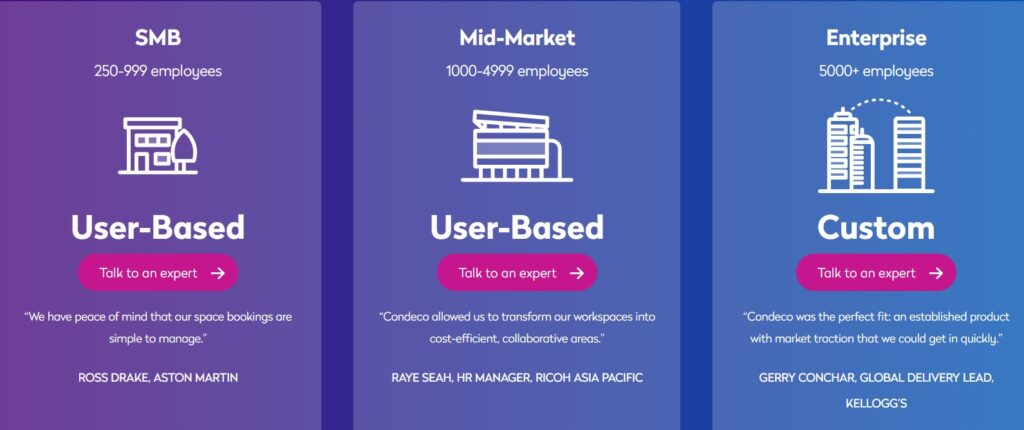
Mid-Market Plan
This plan is made for organizations that have 1000-4999 employees. It serves mid-sized businesses who want complete solutions for their workspace needs. This plan has a pricing offer based on the number of users. It offers advanced features that help to convert the workspaces into cost-effective and collaborative environments.
Enterprise Plan
This one is specifically for big enterprises that have over 5000 workers. It gives customized solutions to meet the extensive and complex requirements of managing workspaces. The plan is very adaptable and guarantees fast integration along with operational effective policy across offices worldwide.
You can read more about the Condeco pricing policy on the official website as well as request a demo of all the premium features before paying for them.
Frequently Asked Questions
- How does Condeco improve workspace booking?
Condeco gives workers the power to effortlessly book work areas like office desks, meeting rooms, and conference rooms where business partners and colleagues can collaborate. You can book the workspace with the Condeco mobile app or platform. Such a flexible system helps small-to-medium teams decide on their working spots and methods to increase the teamwork and company’s efficacy.
- What integrations does the Condeco app support?
The Condeco team collaborates with many platforms to increase each other’s functions. Recently they have boasted the full-scale Microsoft Outlook integration to reserve the meeting areas directly from the client’s emails. Also, Condeco supports collaboration with MS Teams and Zoom to plan virtual meetings with colleagues. Regarding user management, this app is integrated with Azure AD, SCIM, and Okta to provide safe and simple access control.

- How secure is Condeco’s platform?
Condeco supports the InfoSec certifications of ISO 27001, CSA Star, and FSQS. Using Microsoft Azure Cloud – a reliable platform – the developers of Condeco guarantee the safety of data protection and user privacy.
- Can Condeco work effectively both for small teams and large corporations?
Certainly, the Condeco app can be scaled up and can fit into organizations of any size. It doesn’t matter if you are a small business or a big enterprise with many workers, Condeco can offer solutions that are made just for your particular requirements. From managing some desks to improving complicated office arrangements in various places, the flexible platform and professional assistance from Condeco guarantee an easy changeover and efficient use of workspace resources.
- How does the Condeco support work?
Condeco’s customer support team is always ready to assist with any questions or problems 24/7. When you start using this booking app and online service, the detailed welcoming guide explains the basics – do not skip it. The Knowledge Base describes the platform’s key features as well as the already mentioned YouTube channel. Regular updates and maintenance also help improve the user experience more actively which makes Condeco a reliable partner for boosting workplace efficiency and output.
Conclusion
What do you think about the features of the Condeco booking app for solo IT specialists, solopreneurs, and small teams? We think that this platform is a must-have feature if you occasionally book workspaces online and plan meetups both virtually and in the office. This booking app saves money and time for medium and large corporations as well when you need to manage a conference or a teamwork event.