ChatGPT in 2025: Is It Still King of the AI Hill?

ChatGPT in 2025: The “Everything App” for AI?
You know what? It’s been a wild couple of years. Remember when we were all just impressed that a chatbot could write a limerick? Simple times. Fast forward to the end of 2025, and ChatGPT isn’t just a chatbot anymore. It’s a search engine, a coding buddy, a voice assistant that sounds a little too human, and for many of us, the first tab we open in the morning.
But here’s the thing – it’s not the only game in town. You’ve got Claude writing beautiful prose and Gemini integrating with your entire Google life. So, does OpenAI’s juggernaut still hold the crown?
I’ve been using ChatGPT daily – from the basic free tier to the wallet-hurting Pro plan – and I’ve got some thoughts. No marketing fluff, no “game-changing” promises. Just the real deal on what this tool is actually like right now.
The ChatGPT 2025 Lineup: Models and Madness
First, let’s clear up the confusion. OpenAI doesn’t just give you “ChatGPT” anymore. You’re toggling between models like you’re choosing loadouts in a video game. It can get confusing, so here is the breakdown:
- GPT-4o: The daily driver. Fast, smart, sees, hears, and speaks. It’s what most people use 90% of the time. It’s snappy and rarely lags, making it perfect for quick questions or drafting emails.
- o1 (The “Reasoning” Models): This is the heavy lifter. You ask it a question, and it actually pauses to think. It plans. It checks its work. It’s slower, sure, but for coding complex apps or solving math problems that would make a grad student cry, it’s unmatched. It doesn’t just guess; it tries to verify its own logic before spitting out an answer.
- ChatGPT Search: Remember when ChatGPT couldn’t browse the web? Ancient history. Now, it’s a full-blown search engine that cites sources better than I did in college.
The Visual Revolution: Seeing and Creating
We need to talk about vision. In the early days, this was all text. Now? Its eyes and hands. I recently uploaded a photo of my fridge contents – just a sad mix of leftovers and condiments – and asked for a recipe. It actually identified the jar of kimchi in the back and suggested a kimchi fried rice recipe. It wasn’t perfect (it thought my yogurt was sour cream), but it was close enough to be useful.
Then there’s DALL-E 3 integration. It’s built right into the chat. You don’t need to be a “prompt engineer” anymore. You just say, “Make me a logo for a coffee shop,” and it does it. And here’s the cool part: if the text on the logo is spelled wrong (which happens a lot with AI), you can just tell it, “Fix the spelling,” and it actually understands. It’s finally usable for quick mockups without needing Photoshop.
Pricing: Is the ChatGPT Pro Plan for You?
Okay, let’s talk money. OpenAI shook things up this year with a new tier.
| Plan | Price | Best For | The “Catch” |
| Free | $0 | Casual users, students | You get bumped to “mini” models when usage is high. Limited fancy features. |
| Plus | $20/mo | Power users, freelancers | The sweet spot. Access to o1-preview, Search, and Canvas. |
| Pro | $200/mo | Researchers, heavy coders | It’s expensive. Like, car payment is expensive. But you get the “o1 Pro” mode, which is basically a genius on tap. |
| Team | $25/mo/user | Small businesses | Needs a minimum of 2 seats. Great for keeping data private from training. |
Honestly? Stick to the Plus plan. Unless you are literally compiling code 12 hours a day or solving cold fusion, the $200 Pro plan is overkill for 99% of us. The $20 tier is still the best value in tech software right now.
ChatGPT Features That Actually Matter
Forget the hype. Here are the features that actually changed my workflow this year.
1. Canvas: The “Google Docs” Killer?
This was the sleeper hit of 2025. When you’re writing a long article or coding a script, the chat interface sucks. It’s too narrow. Canvas opens a separate window on the right. You can highlight text and say “make this funnier” or “fix this bug,” and it edits just that part. It feels like working with a human editor who doesn’t judge your typos. It saves versions, too, so if the AI messes up (which it does), you can revert back with one click.
2. Advanced Voice Mode
I used to think talking to AI was cringe. Then I tried this. It picks up on your tone. If you whisper, it whispers back. If you interrupt it, it stops immediately. It’s surprisingly useful for brainstorming while you’re cooking or driving. Just… maybe don’t do it in public if you don’t want weird looks. It even handles accents surprisingly well now.
3. Deep Research
The “Search” feature isn’t just a Google wrapper. It reads multiple pages, synthesizes the info, and gives you a clean answer with footnotes. It’s not perfect – it still hallucinates occasionally – but for quick fact-checking, it’s faster than digging through SEO-spam websites.
Data Analysis for Non-Data Nerds
Here is a feature most people sleep on: Data Analysis. You know those messy Excel sheets your boss sends you? The ones with 5,000 rows that crash your laptop? You can drag and drop that file directly into ChatGPT.
I did this last week with my monthly expenses. I uploaded the CSV and said, “Where is my money going?” It didn’t just give me a list. It wrote Python code in the background, ran it, and generated a pie chart showing I spend way too much on coffee. It acted like a junior data analyst. You can ask follow-ups like, “Compare this to last month,” and it modifies the chart instantly.
If you work in an office, this feature alone is worth the $20. It turns “I need an hour to figure this out” into “Here it is.”
The “GPT” Store: Ghost Town or Gold Mine?
A while back, OpenAI launched the GPT Store – basically an App Store for custom chatbots. Is it useful in 2025? Sort of. The store is flooded with junk. There are a thousand “SEO Wizards” and “Logo Makers” that all do the same thing. But if you dig, there are gems:
- Consensus: This one searches academic papers. If you need science-backed answers, it’s incredible.
- Grimoire: A coding wizard that helps you build websites just by describing them.
But the real power isn’t using other people’s GPTs; it’s making your own. I made one called “Email Polisher.” I fed it my writing style and a few rules (be brief, no jargon). Now, I just paste a messy draft, and it fixes it exactly how I like. It took me five minutes to set up, and I use it every day.
Memory: It Finally Knows You
This is creepy but cool. ChatGPT now has “Memory.” If you tell it, “I have a peanut allergy,” or “I prefer Python over Javascript,” it remembers. You don’t have to repeat yourself in every new chat. Over time, it builds a profile of you.
- Pros: It becomes way more helpful. It stops suggesting peanut butter recipes and stops writing code in languages I hate.
- Cons: It feels like a stalker.
Luckily, you can view exactly what it knows about you in the settings and delete specific facts. “Forget I mentioned my ex” is a valid command now.
Desktop vs. Mobile: The Ecosystem
The days of only using ChatGPT in a browser tab are over. The native apps for Mac and Windows have gotten really good. On my Mac, I can hit a shortcut (Option + Space), and a little search bar pops up instantly. I can ask a question and get an answer without ever leaving the window I’m working in. It can also “see” your screen. If I’m looking at a complicated chart, I can trigger the overlay and ask, “What is this chart telling me?” and it analyzes the screenshot instantly.
The mobile app is just as slick. The haptic feedback when you’re using Voice Mode makes it feel tactile. It’s polished software, not just a web wrapper.
ChatGPT vs. Other AI Services (2025 Edition)
I get asked this constantly: “Should I switch to Claude?” It depends. Here’s how I see the landscape right now:
- ChatGPT (OpenAI): The jack-of-all-trades. It’s good at everything – coding, seeing, talking, searching. It’s the Swiss Army Knife. It has the best app, the best voice mode, and the best memory features.
- Claude (Anthropic): The writer. If you want a blog post that doesn’t sound like a robot wrote it, Claude 3.5 Sonnet is still the king of nuance. It just has better taste. It’s less “robotic” and more “thoughtful partner.”
- Gemini (Google): The ecosystem play. If you live in Google Docs and Gmail, Gemini is hard to beat because it can read your emails and draft replies directly inside the Google tab.
Comparison at a Glance:
- Coding: ChatGPT (with o1) wins on deep logic; Claude wins on clean, readable syntax.
- Creative Writing: Claude takes the gold. ChatGPT is silver (it still loves using words like “delve” too much).
- Web Search: ChatGPT Search is currently smoother than Gemini’s interface, which feels cluttered with ads.
My “Day in the Life” with ChatGPT
Look, I don’t use this thing to “transform my existence.” I use it to get home earlier:
- Morning: I dump my messy notes from a meeting into it and say, “Clean this up into bullet points and action items.” Boom. Done in 10 seconds.
- Afternoon: I’m coding a Python script and hit a wall. I switch to the o1 model. I paste the error. It doesn’t just guess; it “thinks” (you can literally see its thought process) and tells me, “Hey, you missed a dependency here.”
- Evening: I use the Voice Mode to practice Spanish. It corrects my accent without being mean about it.
A quick tip: Treat it like an intern, not an oracle. It’s eager to please, which means it sometimes lies just to make you happy. Always check the work.
FAQ
Is the free version enough in 2025?
For basic questions and light writing? Absolutely. But if you want to generate images, analyze data, or use the smart “reasoning” models, you’ll hit a wall fast.
Can it really replace Google Search?
Mostly. For “how to” questions or summaries, yes. For finding a specific local restaurant menu or live sports scores? Google is still better.
What is the “o1” model exactly?
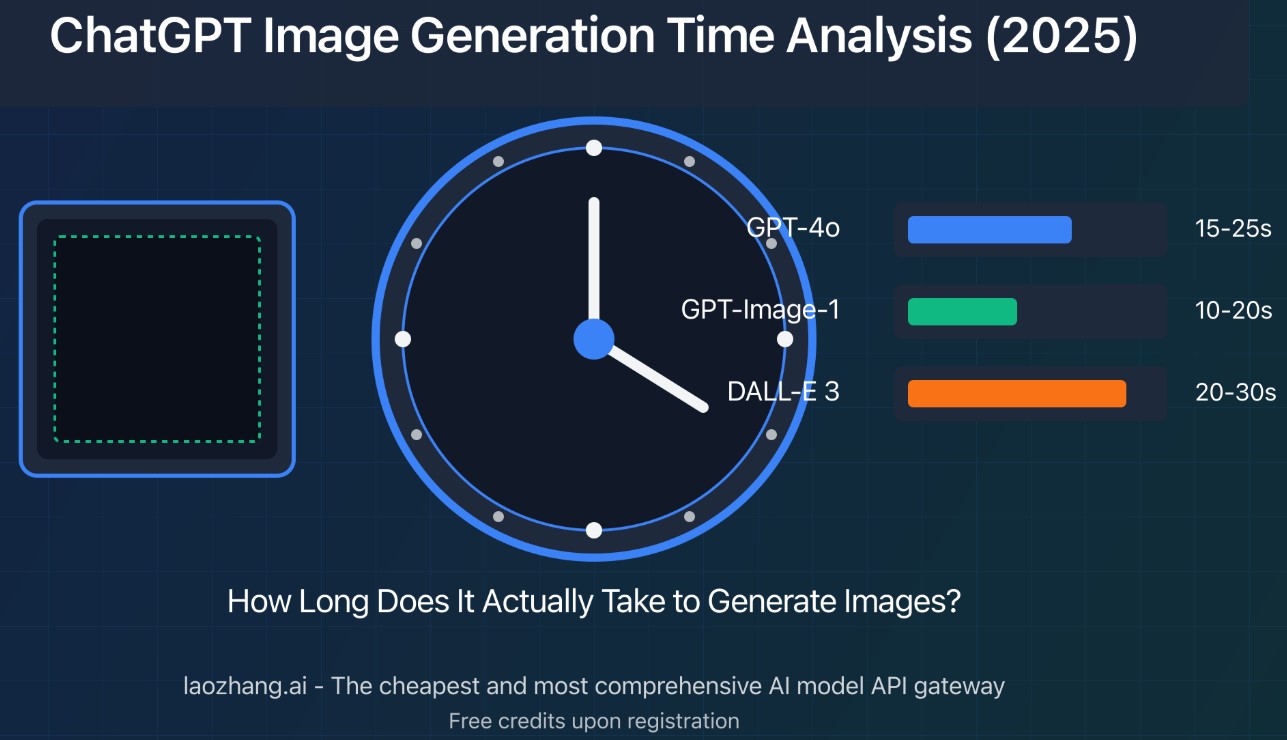
It’s a model trained to “think” before speaking. It takes 10-20 seconds to answer but makes way fewer logic mistakes. It’s essential for math and code.
Is my data safe?
If you are on the Team or Enterprise plan, yes. On Free/Plus, they can train on your chats unless you dig into settings and turn it off. I recommend turning off training if you discuss work stuff.
Does it still hallucinate facts?
Yes. Less than before, but it still happens. Never trust it with medical or legal advice blindly. It can sound very confident while being totally wrong.
Is the $200 Pro plan worth it?
Only if you are a developer or researcher who needs “unlimited” heavy-duty thinking power. For the rest of us, it’s a flex we don’t need.
Can I cancel the subscription easily?
Yeah, it’s a monthly toggle in the settings. No phone calls required, thank goodness.
The Verdict
So, is ChatGPT still the king in late 2025? In terms of raw power and feature set? Yes. It’s the most complete package. You get the best reasoning model (o1), the best voice mode, data analysis, and a solid search engine all in one $20 subscription. It’s the default for a reason. But the gap is closing. Claude feels more “human” to talk to, and Gemini is catching up fast on the utility side.
My advice? Try the Plus plan for a month. If you don’t find yourself using the “o1” thinking models or the Canvas feature, save your money and stick to the free tier. But for me? I can’t imagine going back to the “dumb” internet of 2023. This is the new normal, and honestly, it’s pretty cool.