GeForce RTX 3070 Laptop GPU DLSS 4.5 vs DLSS 5: what to expect
A practical look at the GeForce RTX 3070 Laptop GPU DLSS 4.5 vs DLSS 5 question, covering current capabilities, 1080p benchmarks, and what may change.
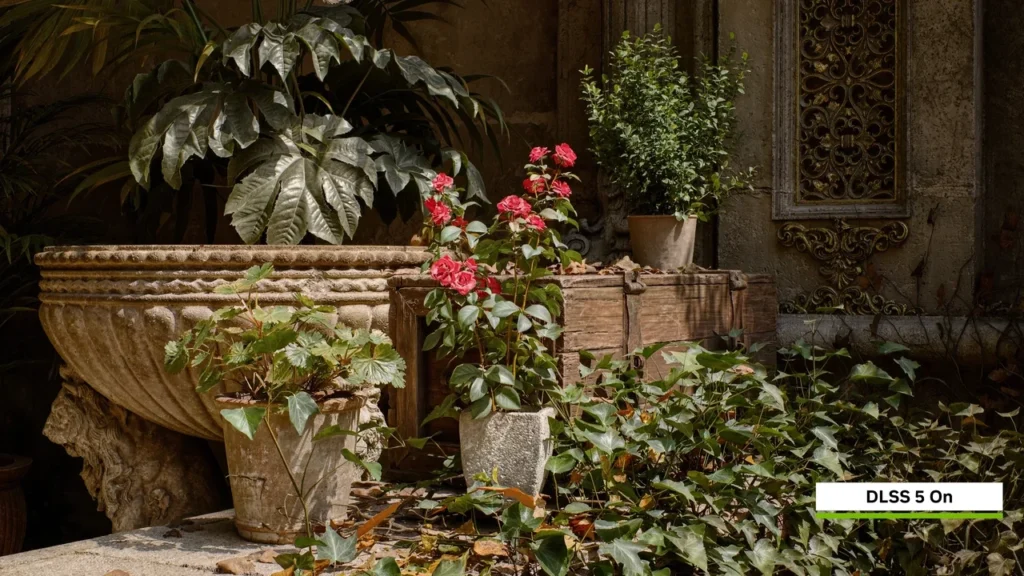
Official DLSS 5 Zorah comparison frame. Image credit: NVIDIA.
GeForce RTX 3070 Laptop GPU DLSS 4.5 vs DLSS 5
The GeForce RTX 3070 Laptop GPU supports DLSS 4.5 Super Resolution and Ray Reconstruction. It does not support Frame Generation, Multi Frame Generation, the RTX 40 and 50 series transformer path, or the RTX 50 dynamic 1.5x, 2x, 3x, and 4x multipliers. NVIDIA has not announced DLSS 5 launch support for this mobile GPU, and future support remains unknown.
That makes the comparison uneven but still useful. DLSS 4.5 is a working Ampere path with measurable benefits. DLSS 5 is an open support question, and any future release would still face hardware limits that a driver cannot remove.
Power limits matter as much as the GPU name
The mobile RTX 3070 uses the GA104 die with 8 GB of GDDR6 on a 256-bit bus, 5,888 CUDA cores, second-generation RT cores, and third-generation Tensor cores. Laptop vendors shipped it at several power levels, including 80 W, 115 W, and 125 W. Two machines carrying the same model name can therefore produce quite different sustained results.
The chip is comfortable at 1920×1080 in most current games and can handle 2560×1440 with sensible settings. It is rarely a good 4K target without aggressive upscaling. Hardware ray tracing, Super Resolution, and Ray Reconstruction are available through the required game and SDK integration. Later optical-flow improvements and the hardware logic behind DLSS 3.5, DLSS 4, and newer frame-generation paths are not.
Use a real chassis when setting a shipping profile. A desktop RTX 3070 on an open bench cannot stand in for an 80 W laptop running against its thermal and acoustic limits.
What DLSS 4.5 provides on Ampere
Super Resolution reconstructs a higher-resolution output from a lower internal render. Ray Reconstruction replaces several hand-tuned ray-tracing denoisers with one neural model. Both run on GA104’s Tensor cores through the standard DLSS SDK.
The newer transformer-based model path that NVIDIA ships for RTX 40 and 50 series hardware is not available here. Frame Generation and Multi Frame Generation are also unsupported and cannot be added in software. On this GPU, Super Resolution delivers the larger frame-rate gain, while Ray Reconstruction primarily improves image quality in scenes with several ray-traced effects.
Native 1080p results show why upscaling matters
Notebookcheck’s page for this exact mobile GPU supplies the verified figures below. All three are 1920×1080 results with DLSS disabled.
1080p native performance, no DLSS
| Game | Resolution | Settings | Average FPS |
|---|---|---|---|
| Cyberpunk 2077 1.6 | 1920×1080 | Ray Tracing Ultra Preset, DLSS off | 34.1 |
| Cyberpunk 2077 | 1920×1080 | Ray Tracing Ultra Preset, DLSS off | 31.6 |
| Alan Wake 2 | 1920×1080 | High Preset + High Ray Tracing | 4.7 |
The two Cyberpunk 2077 runs land in the 31 to 34.1 FPS range, with an exact lower result of 31.6 FPS. Patch level, driver, test scene, and normal run-to-run variation can account for the gap. Alan Wake 2 at 4.7 FPS is far heavier, combining High settings with High Ray Tracing and lighting closer to a full path-traced workload. It is a clear example of a render path that needs temporal reconstruction on this class of laptop.
These numbers do not make the GPU weak; they define the native cost of demanding ray-traced lighting. A game team should calibrate presets against the slowest representative laptop, not against desktop data.
Super Resolution and Ray Reconstruction at 1080p
On the RTX 30 series inference path, the Tensor cores run the reconstruction model, optical-flow hardware contributes motion data, and the engine supplies the lower-resolution image. The integration is functionally the same as the desktop RTX 3070 path, though the laptop’s power ceiling lowers the final frame-rate limit.
Quality mode renders at roughly 1280×720 for a 1920×1080 output. Balanced is roughly 1366×768, while Performance uses 960×540. Ultra Performance is available at higher output resolutions. Lower modes reduce shading work further but give the model less source detail. Quality is the sensible first test at 1080p, with Balanced or Performance reserved for scenes that cannot hold their target.
Ray Reconstruction does not change render resolution. It combines denoising for direct, indirect, and global-illumination samples, and its frame-rate cost is small beside the gains from Super Resolution. The two can run together without an obvious interaction penalty on this GPU.
What a future DLSS 5 release could change
No official DLSS 5 launch support has been announced for the GeForce RTX 3070 Laptop GPU. NVIDIA has not published a date, feature list, or supported path for this SKU.
If support ever reaches Ampere, the plausible route is an updated Super Resolution or Ray Reconstruction model running on the existing Tensor-core path. Multi Frame Generation depends on hardware Ampere does not include. So do the newer transformer path and RTX 50 dynamic frame multipliers described in the current comparison. Those silicon boundaries will not disappear through an SDK or driver update.
Current capability and future limits
DLSS 4.5 vs DLSS 5 outlook on the GeForce RTX 3070 Laptop GPU
| Capability | DLSS 4.5 on RTX 3070 Laptop GPU | DLSS 5 outlook on RTX 3070 Laptop GPU |
|---|---|---|
| Super Resolution | Available. Runs on third-generation Tensor cores via the standard DLSS SDK. | Possible updated model path. No official launch support has been announced; future support remains unknown. |
| Ray Reconstruction | Available. Replaces hand-written ray-tracing denoisers with the unified neural denoiser. | Possible updated denoiser path. No official launch support has been announced; future support remains unknown. |
| Frame Generation | Not supported. Requires Ada Lovelace or newer hardware. | No path to support on Ampere silicon. The feature depends on hardware not present in this GPU. |
| Multi Frame Generation | Not supported. Requires Ada Lovelace or newer hardware. | No path to support on Ampere silicon. |
| Transformer-based upscaling model | Not supported. The transformer model path is exclusive to RTX 40 and 50 series. | No path to support on Ampere silicon. |
| Dynamic 1.5x / 2x / 3x / 4x multiplier | Not supported. Requires RTX 50 series hardware. | No path to support on Ampere silicon. |
The useful distinction is between models that might run on existing Tensor cores and features tied to absent fixed-function hardware. Only NVIDIA’s SDK notes can settle the first category. Software cannot solve the second.
Set the production target around the laptop
A game targeting this GPU should integrate the latest SDK that still supports Ampere, choose internal resolution per output resolution, and use Ray Reconstruction only when it replaces real denoiser work. A 960p internal target for 1080p output is not equivalent to the same internal target for 1440p output. Test the complete path on a closed laptop at a realistic ambient temperature.
Follow the Ampere branch of the SDK release notes rather than guessing at DLSS 5. If a feature does not appear there, it is not available to the shipping build.
Settings advice for current owners
Quality mode is the best starting point at 1080p. Enable Ray Reconstruction when a game combines several ray-traced effects. Frame Generation will be absent or greyed out because the GeForce RTX 3070 Laptop GPU does not support that path.
There is no reason to wait for an unannounced DLSS 5 update before running a current game. The 34.1 FPS Cyberpunk 2077 1.6 baseline is exactly the kind of result that today’s Super Resolution path is intended to improve.
Read the benchmark spread as a band
The Cyberpunk results use Ray Tracing Ultra with DLSS off and should be read as a 31.6 to 34.1 FPS range, not as conflicting absolutes. Alan Wake 2 at 4.7 FPS is a different and much heavier workload. It is best treated as the lower performance bound of this verified set, while the Cyberpunk band is the more realistic native worst case for many 1080p ray-traced titles.
Do not transfer either conclusion from a desktop card. Laptop wattage and sustained cooling can move the result enough to change a preset recommendation.
Pick presets for the chassis, not the label
Start with Quality at 1080p because it retains enough input detail for silhouettes, text, and small UI elements. Balanced works when native performance is close to the target. Performance and Ultra Performance make sense when the alternative is an unplayable native result. In an Alan Wake 2 class path-traced scene, Performance plus Ray Reconstruction may be the better trade because an unstable legacy denoiser can look worse than the lower internal resolution.
Expose all four presets. The owner of an 80 W laptop may need a different choice from someone using a 125 W model, even though both machines report the same GPU name.
Why newer hardware remains different
RTX 40 and RTX 50 hardware can add Frame Generation, Multi Frame Generation, the transformer-based upscaling path, and dynamic multipliers. None of those paths can be assumed to arrive on GA104 through software. The purchasing question is whether those extra features justify newer hardware, not whether a future version number will erase the silicon gap.
For a studio, the 3070 Laptop GPU can cover the RTX 30 DLSS 4.5 path in a minimum or supported specification. A newer card belongs in the recommended specification if the design depends on generated frames or newer model paths.
Shipping checklist for this GPU
- Integrate the latest DLSS SDK that supports the RTX 30 series family. The SDK defines which features the hardware can expose, and an old build may hide supported functionality.
- Expose all four Super Resolution presets at 1080p. Quality, Balanced, Performance, and Ultra Performance let players adapt to different chassis power limits.
- Integrate Ray Reconstruction for any title that combines multiple ray-traced effects. The neural denoiser replaces several hand-written paths without a large frame-rate cost.
- Validate the result on a real laptop chassis. An open desktop bench does not reproduce sustained mobile thermals.
- Document the minimum and recommended specification honestly. The minimum should reflect this GPU’s DLSS 4.5 features; the recommended line can name a faster RTX 30 card or newer generation.
The engineering, menu, renderer, QA, and documentation costs are all measurable. Together they are still cheaper than shipping a preset that assumes unsupported hardware.
Common questions from a review meeting
- Does the GPU support DLSS 5 today? No. Launch support has not been announced, and future support remains unknown.
- What is the latest supported version? DLSS 4.5 Super Resolution and Ray Reconstruction.
- Can it run DLSS 3 Frame Generation? No. The feature requires Ada Lovelace or newer hardware.
- Can a driver add Frame Generation? No. GA104 lacks the required hardware logic.
- Is Super Resolution functionally the same as on a desktop RTX 3070? Yes, but the mobile power and clock limits lower the frame-rate ceiling.
- Does Ray Reconstruction improve speed or quality? It primarily improves denoising quality and stability, with a small frame-rate cost.
- Which preset should 1080p users try first? Quality, then Balanced. Use Performance or Ultra Performance only when native rendering is otherwise unplayable.
Frequently asked questions
Does the GeForce RTX 3070 Laptop GPU support DLSS 5?
No official launch support has been announced, and future support remains unknown. DLSS 4.5 Super Resolution and Ray Reconstruction are the current supported features.
What could DLSS 5 add on this GPU?
If NVIDIA supports Ampere, an updated Super Resolution or Ray Reconstruction model is the plausible route. Frame Generation, Multi Frame Generation, the newer transformer path, and dynamic multipliers depend on silicon that GA104 does not have.
Can Frame Generation be added through a driver update?
No. The required hardware logic is absent, so a driver or SDK cannot add it.
What is the right DLSS 4.5 preset for 1080p?
Quality is the normal starting point. Balanced can help when the game is close to target, while Performance and Ultra Performance are fallback choices for the heaviest workloads.
Is the mobile RTX 3070 the same as the desktop card for DLSS?
Both use the same SDK and reconstruction features. The laptop part has lower power and sustained clocks, so every shipping preset still needs validation on mobile hardware.
What is the verified native 1080p performance?
The measured results are 34.1 FPS in Cyberpunk 2077 1.6 at Ray Tracing Ultra, 31.6 FPS in Cyberpunk 2077 under the same named preset, and 4.7 FPS in Alan Wake 2 at High with High Ray Tracing. DLSS is off in those runs.
Could DLSS 5 improve ray tracing if support arrives?
Any gain would have to come through an updated reconstruction or denoising model on the existing Tensor-core path. No measured result or official feature set exists for this GPU.
Should a 2026 game still integrate DLSS 4.5?
Yes. It gives owners the two features their hardware can run. Do not promise Frame Generation, Multi Frame Generation, or the newer transformer model on Ampere.
What should a player do now?
Try Quality at 1080p, enable Ray Reconstruction where available, and ignore Frame Generation controls that are unavailable on the laptop.
What is the shortest honest comparison?
DLSS 4.5 works on the GeForce RTX 3070 Laptop GPU. DLSS 5 support is unannounced and uncertain, while several newer feature paths are permanently outside GA104’s hardware capabilities.